How to Pick a Digital Menu Board for Food Truck
The most common advice about a digital menu board for food truck operators starts with buying a bright screen. That's the wrong starting point. First decide whether replacing your existing board would save enough work to justify outdoor hardware, extra power demand and another piece of equipment to secure during transport.
A truck parked at the same busy pitch with frequent stock changes has a credible case for digital signage. A roaming pop-up with a steady menu often doesn't. Buy for the way you trade, not for the way a screen looks in a demonstration.
Table of Contents
- Which Menu Format Fits a Food Truck
- What a Truck Menu Board Can and Cannot Do
- Sunlight Weather and Power Requirements
- What the Board Costs to Own
- Design a Queue Menu and a Phone Menu
- A Service Day With and Without a Screen
- Match the Board to How You Trade
Which Menu Format Fits a Food Truck
Digital isn't the automatic upgrade. The useful comparison is between a sunlight-readable display, a weatherproof printed or magnetic board, and a phone menu. Each solves a different problem, and combining them can make more sense than replacing everything.
An outdoor screen suits a vehicle that returns to the same pitch, makes frequent price or availability changes, and has spare electrical capacity. Print suits an operator who needs to unload, serve and pack away with minimal equipment. A phone menu holds the information that would make either physical board too crowded.
Screen, Print or QR for a Food Truck
| Setup | Best when | Weak when | What guests see |
|---|---|---|---|
| Outdoor digital menu board | Stable pitch, several price or stock changes a week, power available | Daily moves, short hours, tight budget | Large names and prices at the window |
| Printed or magnetic board | Few menu changes, heavy relocation, low power | Daily specials and sold-out updates | A fixed list until the next reprint |
| QR phone menu | Allergens, languages and longer descriptions | Used as the only menu in a sunny queue | The full menu on the guest's phone |
| Hybrid short list plus QR | Most independent trucks | The window list is missing or unreadable | A short list in the line and detail on the phone |
The hybrid setup is my default recommendation for an independent truck. People can choose a meal without getting out a phone, while anyone who wants ingredient details or photographs can open the digital version. The practical setup in this QR menu guide for food trucks suits that division of work.
Don't confuse a QR code with a visible menu. A guest with a flat battery, weak reception or little confidence using a phone still needs to know what you sell and what it costs. Put a readable list where people wait, rather than expecting everyone to reach the hatch before making a choice.
Buying rule: If a weatherproof list already handles the queue and your phone menu handles the detail, the screen needs to solve a specific remaining problem.
That problem might be constant sold-out changes or switching between different trading menus. It shouldn't be that another truck has a screen. Keep the cheaper setup unless you can name the work the display will remove.
What a Truck Menu Board Can and Cannot Do
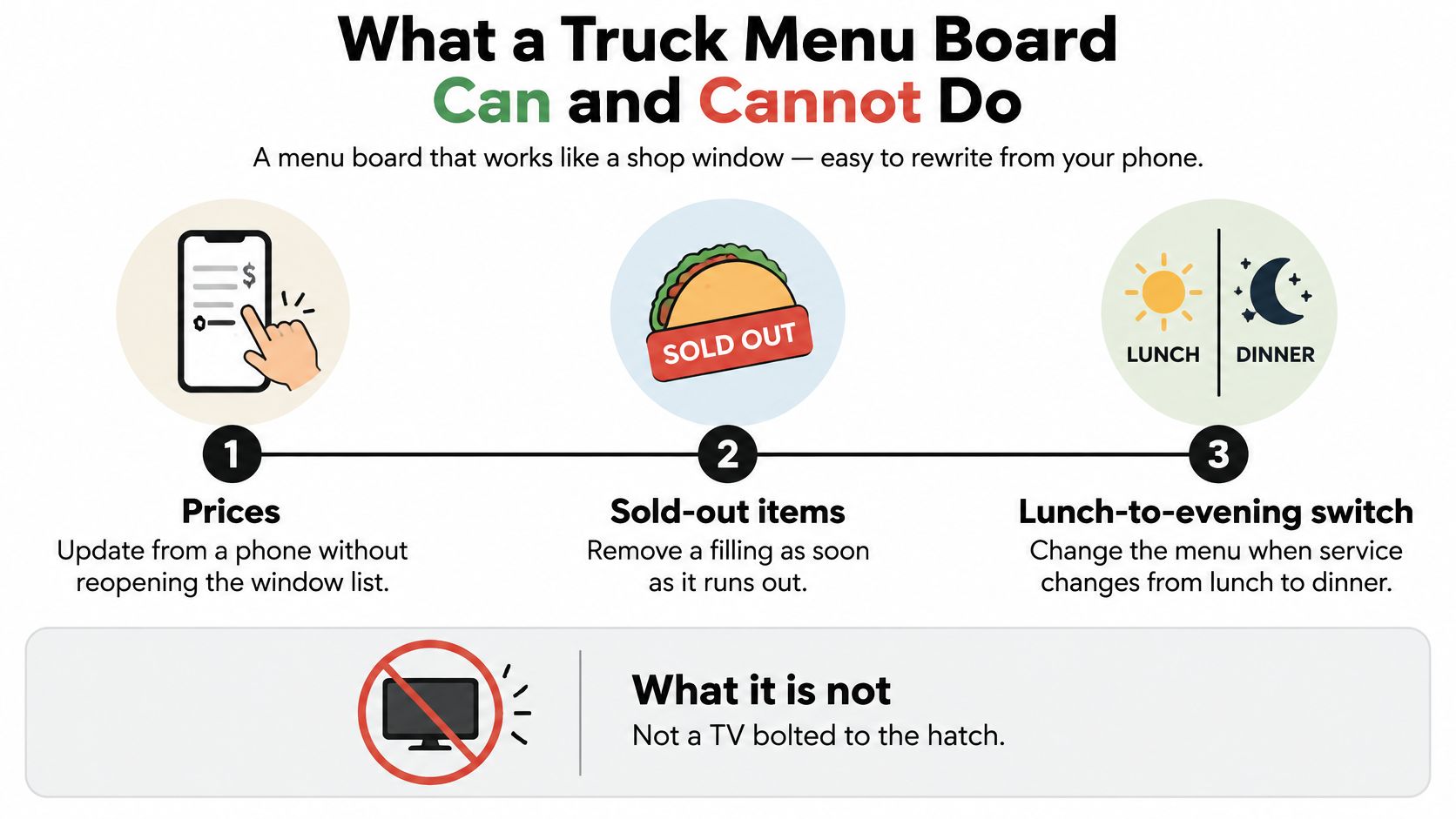
Say your lunch menu includes a filling that runs out during the rush. With a connected display, the person responsible for the menu can remove it while the kitchen continues serving. The value isn't motion graphics. It's correcting the shop window without printing another sheet.
This isn't new technology adapted yesterday. Nation's Restaurant News describes food-truck operator Juicys using a compact controller and cloud-based content library in 2014, with the solution receiving a Gold award at that year's Digital Signage Expo. The relevant development for a small operator was manageable hardware and remotely changeable content, not the scale of restaurant-chain installations.
The operating jobs are straightforward:
Keep a Master Menu, Not Separate Versions
Build your master list in a free menu creator, then prepare the window layout from that list. Keep name, price and availability as the essential operating fields. Longer descriptions belong elsewhere, not squeezed beneath every dish.
A board doesn't take an order, answer an ingredient question or know that the kitchen has emptied a container. Someone must make the change, and you must confirm whether your chosen menu tool exports content, integrates with signage software or requires a separate update. This guide to making a digital menu helps organise the content before choosing the display.
- Assign an owner: Name the person who changes availability during service.
- Test remote updates: Confirm the player receives changes over mobile data away from your usual Wi-Fi.
- Check offline behaviour: Disconnect the connection and see whether the last approved menu remains visible.
For connectivity planning between pitches, SwiftNet Wifi's guide to mobile data plans for truckers is a useful starting point. Check local coverage and service terms yourself before relying on any plan at a trading location.
Sunlight Weather and Power Requirements
Specify the panel for the brightest trading hour at the actual mounting position, not for the supplier's showroom. Take a light meter to the pitch, measure at the proposed bracket position and note whether the sun reaches the screen as the day progresses. A canopy that shades the hatch doesn't necessarily shade the display.
The DigitalSignage.com installation guide gives the following brightness targets: 4,000–5,000+ nits for direct sun, rising to 5,000–7,500 nits at about 30,000–100,000 lux; approximately 2,000–3,000 nits for shade; and 100–300 nits at night. It contrasts those requirements with typical indoor displays at 300–500 nits.
Outdoor Board Specs for a Food Truck
The brightness entries below follow that installation guidance. The sealing, temperature and electrical recommendations follow the DigitalSignage.com outdoor-display guide, which recommends IP65 or IP66 protection, gives approximately -30°C to 50°C as a reference operating envelope, and discusses maximum-brightness power sizing.
| Condition | Specify | If you underspecify |
|---|---|---|
| Direct sun | Sunlight-readable brightness matched to measured light | An indoor panel washes out |
| Shaded service window | A commercial panel rated for shaded outdoor visibility | A domestic TV can still be too dim |
| Night service | Automatic dimming to the nighttime range | Daytime peak glares and may conflict with local sign rules |
| Rain and road dust | IP65 minimum; IP66 if fully exposed | Water and dust can reach unsuitable components |
| Local temperature | A manufacturer-rated range covering the local climate | Heat can cause display faults or shutdown |
| Power circuit | Maximum-brightness watts plus other loads | The inverter may brown out at startup |
Choose an anti-glare optical treatment and an ambient-light sensor. Brightness alone won't remove reflections, and leaving the panel at daytime output after dark makes it uncomfortable to read. Automatic dimming should follow actual conditions rather than relying only on a fixed evening schedule.
Treat Heat and Electrical Load Separately
A weather-resistant enclosure isn't permission to trap the panel in a sealed homemade box. High-output backlights generate heat, and poor ventilation can produce black spots, colour changes and shutdowns. Preserve the manufacturer's airflow clearances and keep the installation away from cooking exhaust and refrigeration condensers.
Mount under a rain hood where practical, and have the installer protect cable entries as carefully as the front glass. Check whether the quoted protection rating applies to the complete assembly or only part of it. The mount also needs a transport plan, including how the panel locks, folds or comes off.
- Read maximum consumption: Ask for power demand at full brightness, not just the typical operating figure.
- Include simultaneous loads: Have a qualified installer assess the screen alongside refrigeration, pumps and other equipment.
- Check continuous-use suitability: The outdoor-display guide's commercial duty-cycle recommendations should inform the purchase, rather than assuming a domestic television suits a full trading day.
A cheap indoor television is only cheap if your operating environment lets you use it. Don't buy one for an exposed hatch and expect a plastic cover to solve brightness, heat and weather together.
What the Board Costs to Own
Start with the complete installed cost, not the panel advertisement. PosterBooking's signage cost guide places a single outdoor display at approximately $3,500–$8,000 and an installed commercial system at $6,500–$12,500 per screen. These are published dollar-denominated industry estimates, not local quotes or a country-specific budget.
Cost Lines for a Food-Truck Menu Board
| Cost line | Published range | What to check |
|---|---|---|
| Single outdoor display | $3,500–$8,000 | Industry estimate, not a local quote |
| Installed commercial system | $6,500–$12,500 per screen | Ask what mounting is included |
| Hood, enclosure and anti-glare | Often extra | Needed for the actual exposure at your hatch |
| Inverter, battery or shore power | Quote against maximum-brightness watts | Add startup load from other equipment |
| Cellular data and content software | Obtain a plan-specific quote | Needed for remote updates off Wi-Fi |
| Repairs, theft and daily removal | Budget against your transport arrangements | A screen stored in the cab earns no trading value |
Ask suppliers to separate the display, player, software, enclosure, installation and electrical work. Otherwise, an attractive equipment price can conceal a substantial installation bill. Confirm local taxes, currency, delivery, warranty coverage and whether somebody will service the unit where you trade.
Calculate Payback Against the Alternative
Record how often you replace or amend your current menu. Include the materials, travel to a printer and the time someone spends preparing and mounting it. Then subtract the screen's ongoing electricity, connectivity, software and maintenance costs from those avoidable expenses.
Simple payback = installed cost ÷ monthly net saving. If there's no positive monthly saving, the screen has no cost-saving payback. You would need a separate, measured commercial reason to buy it.
Count additional profit, not additional sales, when judging whether a display earns its keep.
Consider a hypothetical example, not a supplier quote: a $3,500 display plus a $600 hood and mount, allocated across 36 months, comes to about $114 a month before power, data or repairs. If a hypothetical weatherproof reprint costs $40 and you need it twice monthly, that alternative costs $80 a month. On those assumptions, avoided printing alone doesn't justify the screen.
Those inputs should come from your own invoices. Don't copy the example into a purchase proposal and treat it as a market price. Also distinguish an accounting allocation from actual payback: spreading a purchase across months doesn't mean you've recovered the cash.
Long shifts at a recurring pitch make expensive hardware easier to use productively. Short appearances, repeated removal and long periods in storage do the opposite. A rugged printed board plus a phone menu can be the better investment, even when you can afford digital signage.
Design a Queue Menu and a Phone Menu
Stand back from the hatch where a customer would wait, then move sideways into the line. If you can't read the names and prices without leaning forward, simplify the layout before increasing the screen size. Your design must work for someone who isn't directly in front of it.
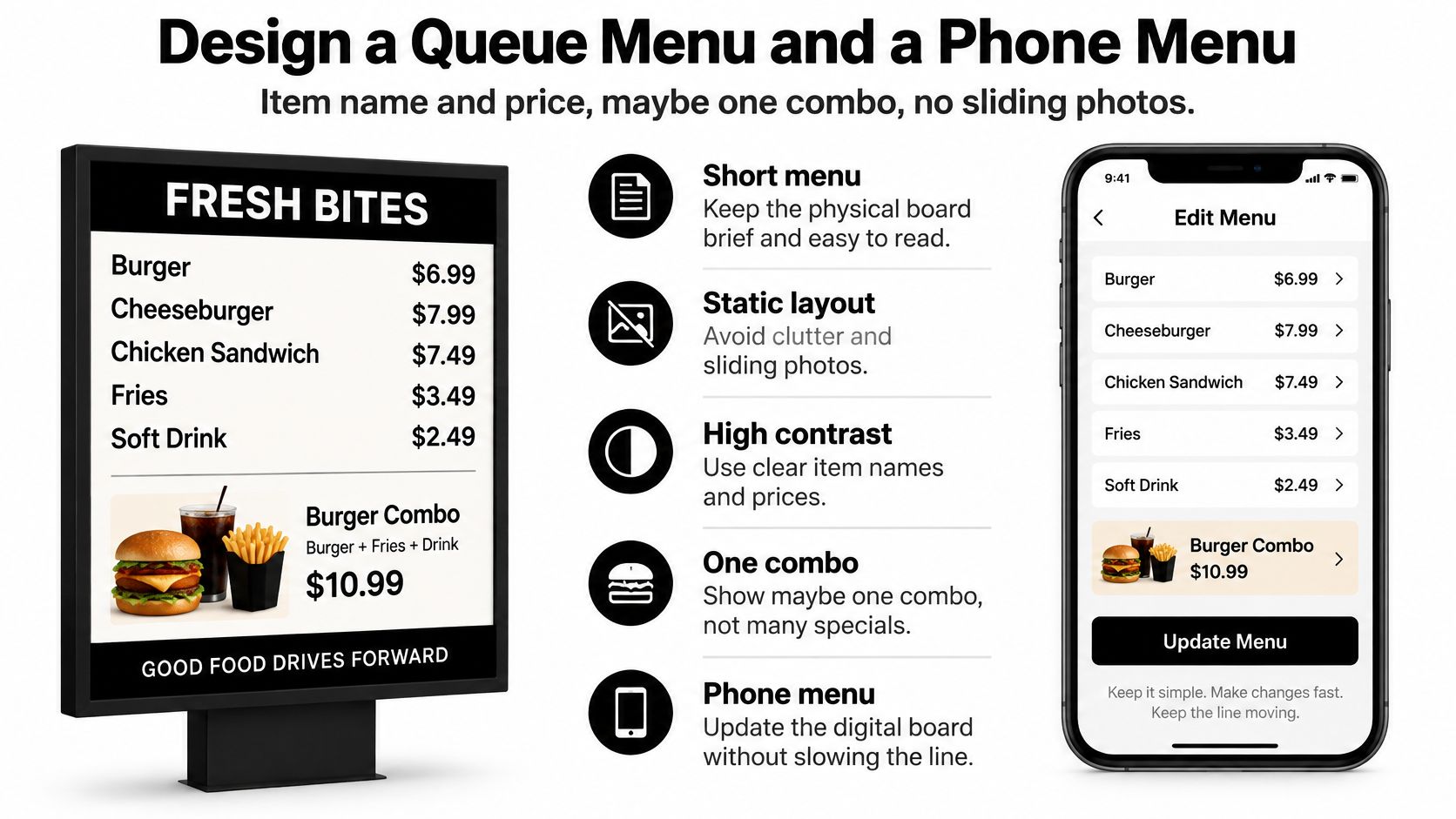
Keep the visible menu static and high contrast. Item name and price, maybe one combo, no sliding photos. A customer shouldn't have to wait for a carousel to return before checking what a meal costs.
Use this split when preparing the layouts:
Let the Phone Hold the Detail
A study published in the Journal of Quality Assurance in Hospitality & Tourism, involving 844 restaurant customers, found that perceived information quality, system reliability and interactive features influenced QR-menu performance perceptions and satisfaction. That's a reason to prioritise an accurate, reliable page over decorative effects.
Generate a direct-to-menu code with a free QR code generator. Don't make guests pass through a promotional landing page to find lunch. Keep a visible non-phone route for anyone who can't scan.
Use a free menu creator for editable dishes, descriptions and prices. Add photographs where they help explain unfamiliar food, following this practical approach to creating a digital menu with photos. Test the result on an ordinary phone over mobile data, not only on your office connection.
Make Ingredient Information Usable Before Ordering
For EU operators, the European Commission's food-information guidance explains that Regulation (EU) No 1169/2011 requires allergen information for non-prepacked food, with the rules applying since 13 December 2014 and covering 14 regulated allergens. Operators elsewhere should check their local requirements rather than assuming the EU framework applies.
Map dishes to their actual ingredients and maintain an allergen menu. Make the information accessible before purchase, with a clearly signposted alternative to scanning. The ingredient list also needs to reflect substitutions, sauces and garnishes, not just the main component.
- Keep answers consistent: Anyone answering ingredient questions should use the maintained list and never guess about cross-contact.
- Translate the same dishes: At visitor-heavy pitches, use menu translation rather than maintaining unrelated versions with conflicting prices.
- Check readability with guests: A private feedback form can collect comments about missing information or difficult navigation.
The window helps someone decide what to order. The phone gives them room to investigate it.
A Service Day With and Without a Screen
Consider ordinary trading situations rather than a showroom demonstration. Each puts a different part of the purchase decision under pressure.
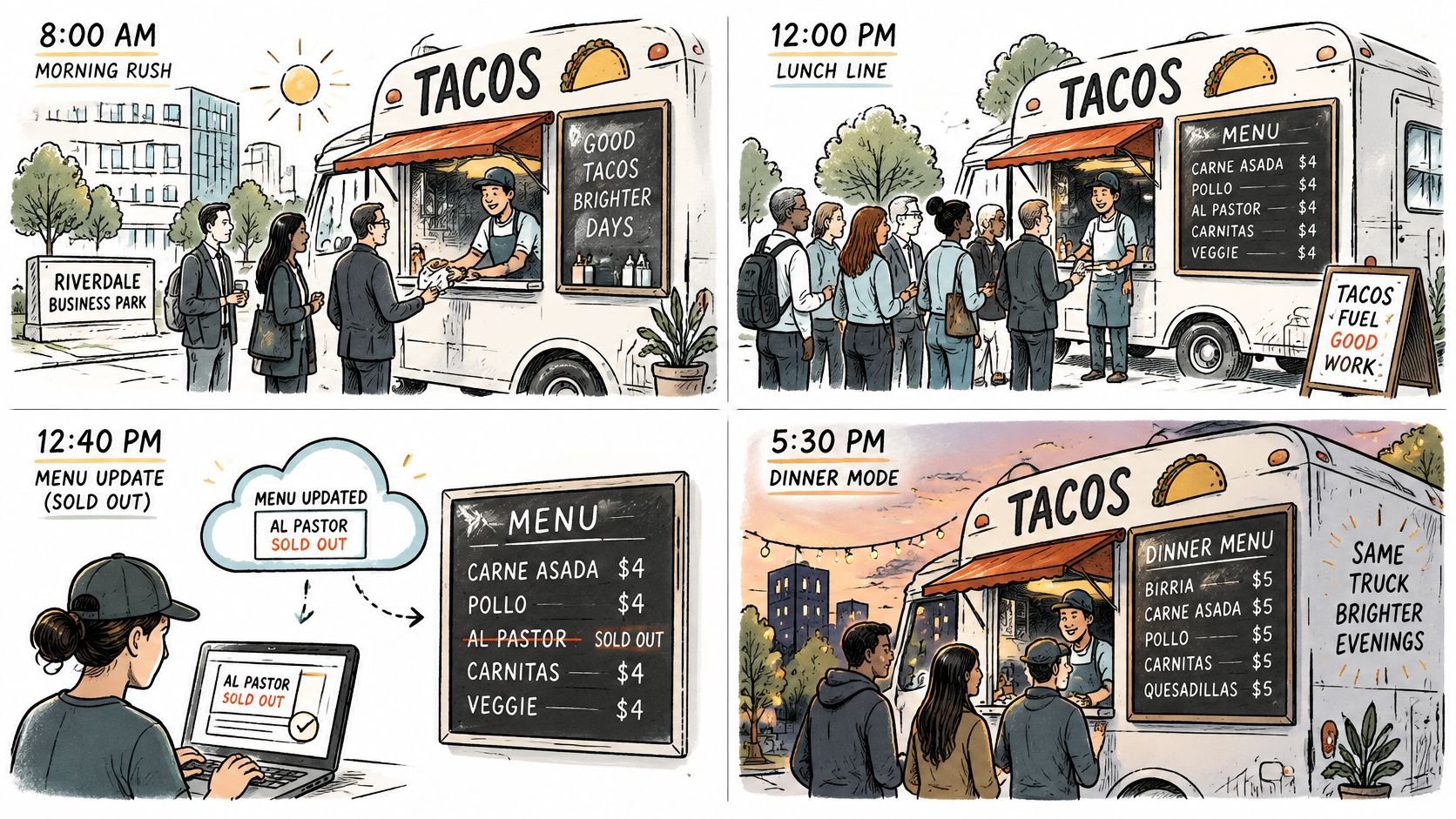
The sequence below illustrates how an operator might manage changing availability:
The Recurring Lunch Pitch
Say a taco truck in a business park sells out of a filling during lunch. The operator responsible for availability removes it from the displayed list and checks the customer-facing page. The important action is verification, not merely pressing save.
Without an editable screen, the operator needs a physical correction ready to attach to the board. That can work perfectly well, but it must be visible before guests reach the till. The workflow in this guide to updating a QR menu in real time helps keep the phone version aligned with what the kitchen can serve.
The Exposed Festival and Evening Market
At an exposed festival pitch, a screen that looked clear during setup may become reflective when sunlight reaches the hatch. The operator needs the specified outdoor panel and working brightness control, not a last-minute attempt to fix the problem through larger lettering.
At an evening market, the same operator checks that automatic dimming has taken effect. For a visitor-heavy weekend, a concise visible list and translated phone descriptions may do the job without adding another display.
For a visual companion to the operating scenarios, the video sits below.
The Pop-Up That Should Keep Print
Now consider a hypothetical pop-up that moves city every Friday, trades for a short evening and rarely changes its specials. Its operator carries a laminated core menu and a direct menu code. An outdoor screen would add packing, storage and security work without removing much existing work.
Credence Research reports that in 2025, 61% of food trucks used digital menus and 66% had adopted mobile ordering systems. Those categories don't establish that an exterior screen suits every truck. A digital menu on a phone and a digital board at the hatch are different purchases.
The recurring lunch truck has an operational reason to consider a screen. The roaming pop-up has a good reason to leave one in the catalogue.
Match the Board to How You Trade
Write down the facts of your own trading week before contacting suppliers:
- Pitch stability: How much service time do you spend in a recurring location?
- Menu movement: How often must you change prices or remove unavailable items?
- Sun exposure: Does direct light hit the proposed mounting position during service?
- Electrical capacity: Can the system carry the panel's maximum demand alongside the kitchen?
A stable pitch, frequent changes and suitable power justify asking for outdoor quotes. Sun exposure determines the display specification, not whether digital is worthwhile by itself. Reject unsuitable indoor panels before comparing prices.
If you move constantly, trade briefly or keep a stable menu, keep the physical list and improve the phone experience. Use responsive menu design so the page remains usable across different devices.
Set Up the No-Screen Route
- Build dishes and current prices with the free menu creator.
- Maintain ingredient mappings and filters in the allergen menu tool.
- Add relevant guest languages with AI menu translation.
- Print a direct menu code using the free QR code generator, then test it outside before service.
The core toolkit is free; an optional Pro plan adds full AI translation and branding options. Start with the menu people need, then buy hardware only when your trading pattern supports it.
TopFoodApp offers editable phone menus, QR codes, allergen filters and translation tools that can support a printed hatch list or complement an outdoor display. Build your current service menu, test it at the pitch, and use that working setup to decide whether a screen is worth the investment.