Search Functionality for Digital Menus: A Practical Guide
A Friday-night guest opens your digital menu on her phone and finds a wall of dishes. She has a gluten allergy, the menu is long, and every scroll reveals another item she can't confidently order. By the time she reaches the appetizers, she's already considering asking a server, abandoning the order, or choosing the safest familiar option.
That situation exposes a common mistake. Search functionality isn't just a search box. It's the combination of indexing, ranking, filtering, and presentation that helps guests find something relevant, safe, and appealing without fighting the menu. For restaurants, the strongest implementation turns a crowded catalog into a navigable ordering surface.
Table of Contents
- Why Search Functionality Matters for Modern Menus
- How Search Became a Default Expectation
- Core Components of Menu Search Functionality
- Why Search Bars Alone Are Not Enough
- Implementation Options and Their Trade-offs
- UX Best Practices for Restaurant Search
- Measuring Search Performance and Conversion
- Building Fast Search with TopFoodApp
Why Search Functionality Matters for Modern Menus
A paper menu can be cluttered, but guests can usually scan its physical structure at a glance. A digital menu has different constraints. On a phone, categories, descriptions, dietary information, prices, and add-ons compete for limited screen space. A guest may need to find a dish by name, ingredient, dietary preference, allergen status, or even a vague craving such as “something spicy.”
Effective menu search functionality handles that intent in a few steps:
- The guest enters a query, such as “chicken,” “vegan,” or “gluten-free.”
- The system searches structured menu fields, not only visible dish titles.
- Results are ranked by relevance, so the most useful options appear first.
- Filters narrow the set, including categories, dietary labels, and allergen exclusions.
- The interface presents enough context for the guest to decide without opening every result.
That last step matters more than many operators expect. A result that displays only a dish name forces the guest back into the same uncertainty that search was supposed to remove. The result should preserve the category, price, description, image, and safety information that support a confident choice.
Practical rule: Treat search as core menu infrastructure. A search box without accurate indexing or trustworthy filters is only decorative.
The operational benefits follow from task completion. Guests can locate sides, drinks, and suitable alternatives more easily, which creates more opportunities for a complete order. Staff may also face fewer repetitive questions about ingredients and dietary suitability, although a digital filter should never replace the restaurant's allergy communication and preparation controls.
Search also gives operators a better way to manage large menus. Seasonal items, room-service sections, cocktail lists, and multi-location variations become easier to find when each item has structured metadata. The restaurant isn't asking every guest to read the full catalog. It's giving each guest a route to the right part of it.
How Search Became a Default Expectation
Search moved from a specialist tool to a routine navigation layer long ago. Pew Research reported that 91% of online adults used search engines in February 2012, compared with 84% in June 2004, while daily search use reached 59% of internet users, compared with 30% in 2004. Those figures show how search had become a standard part of ordinary online behavior by the early 2010s, rather than proving a current usage rate. Pew's historical search-use findings provide the important context: users had already formed a strong habit of searching for information instead of navigating every site manually.
Google's own growth illustrates the scale of that behavioral shift. Google handled about 10,000 queries per day when it launched in September 1998, reached 3.5 million daily queries by September 1999, and passed 200 million daily queries by April 2004. The same historical record cites estimates of more than 9 billion searches per day by 2025, a projection rather than a directly measured current figure. This search-history overview shows why speed, relevance, and filtering became fundamental design concerns.
The expectation gap in restaurant menus
Guests carry those habits into every dense digital interface. They search products in shops, articles in publications, bookings in travel apps, and messages in communication tools. A restaurant menu with dozens of sections and dishes is another catalog, so guests naturally expect more than a sequence of taps and endless scrolling.
The problem is that many restaurant menus still provide category browsing only. That creates a mismatch between how guests expect to retrieve information and how the menu makes them do it. A customer looking for a nut-free dessert shouldn't have to inspect every dessert description, then return to the top, then repeat the process for drinks or sides.
Search functionality closes part of that gap, but it must be paired with visible structure. A guest might type an exact dish, browse popular categories, or select an allergen filter without entering any text. The interface should support all three behaviors instead of assuming every user knows what to type.
Core Components of Menu Search Functionality
A reliable menu search system has four connected parts. Operators don't need to build each one from scratch, but they do need to understand what each part controls. If one fails, the search experience can look functional while producing weak or unsafe results.
Indexing is the preparation layer
Indexing converts menu content into searchable information. The index should include dish names, descriptions, ingredients, category names, dietary labels, allergen data, synonyms, and relevant option names.
If the dish title is “Garden Bowl” but the description contains quinoa, chickpeas, herbs, and a vegan label, a guest searching for “vegan bowl” should still find it. If the index includes only titles, the system misses the language guests use.
Indexing also determines how quickly the restaurant can update its menu. A new seasonal dish, changed ingredient, or removed allergen tag must reach the searchable structure promptly. Stale indexing can make a result appear available when the kitchen no longer serves it.
Relevance controls the order
Relevance decides which results appear first. A query such as “spicy chicken” could match a dish title, a description, an ingredient, or a tag. A sensible ranking model gives greater weight to exact dish names while still recognizing meaningful matches in supporting fields.
Traditional lexical approaches such as BM25 are often practical for menus because guests frequently search for concrete words, ingredients, and dish names. Semantic retrieval can help with broader intent, but it introduces engineering and performance trade-offs. The ranking system should serve the menu's actual vocabulary, not showcase a more complex model just because it's available.
Filters create controlled narrowing
Filters reduce the result set according to explicit conditions. Useful examples include category, dietary preference, allergen exclusion, price range, and availability.
Allergen filters require special care. “Doesn't contain nuts” and “prepared in an allergen-safe environment” aren't the same promise, so the data and interface must reflect the restaurant's real controls. A filter should remove items that fail the selected condition before the guest chooses among ranked results, not merely place a label beside potentially unsuitable dishes.
Presentation turns retrieval into a decision
Presentation is the visible result experience. Search should highlight matching terms where helpful, keep category context visible, show active filters clearly, and provide a useful empty state when nothing matches.
These parts interlock. Accurate indexing supplies candidates, relevance ranks them, filters narrow them, and presentation helps the guest understand them. Remove indexing and queries miss dishes. Remove relevance and results feel random. Remove filters and dietary discovery becomes laborious. Remove context from the result card and the guest still has to reconstruct the menu mentally.
Why Search Bars Alone Are Not Enough
A prominent search field can create the illusion that a menu is easy to use. Usability evidence from a restaurant menu case study challenges that assumption. In testing with 11 participants, only 2 used the search bar or tag search to find vegan-friendly items. The restaurant menu navigation study is a small usability study, not a universal benchmark, but its direction is important: guests often scan categories and familiar visual patterns instead of formulating a query.
That behavior makes sense. Hungry guests usually browse for appealing options, compare dishes, and look for recognizable labels. They may not know whether the restaurant calls an item “plant-based,” “vegan,” or “vegetable-forward.” A search box can't solve vocabulary problems that the menu's labels and structure create.
Build several discovery paths
The better approach is discoverability architecture. Search should be one route among several:
- Category browsing helps guests who want to explore a meal type.
- Allergen filters support guests with safety constraints.
- Dietary tags help people make preference-based decisions.
- Popular or featured labels guide guests who want a quick recommendation.
- Images and concise descriptions support visual scanning.
- Text search serves guests with a specific dish, ingredient, or craving.
The table below describes these paths qualitatively rather than assigning unsupported usage shares.
| Discovery Path | Typical Use Share | Best For |
|---|---|---|
| Category browsing | Often a primary route | Guests exploring familiar meal sections |
| Allergen filters | Intent-led route | Guests avoiding specific allergens |
| Dietary tags | Preference-led route | Vegan, vegetarian, or other diet searches |
| Images and featured labels | Visual browsing route | Guests choosing by appetite or recommendation |
| Text search | Direct retrieval route | Guests looking for a known dish or ingredient |
Search is an input, not the front door. The menu should remain understandable when a guest never types a query.
A 120-item menu needs hierarchy before it needs sophistication. Use clear sections, consistent labels, visible dietary cues, and filters that work across the entire catalog. Then add search for guests who want direct retrieval. This layered design serves both the scanner and the searcher, instead of forcing every customer into the same interaction.
Implementation Options and Their Trade-offs
Operators usually choose among client-side, server-side, and third-party search. The right answer depends on menu complexity, update frequency, analytics needs, and the team's ability to maintain infrastructure.
Client-side search downloads a prebuilt index to the browser and searches it locally. Libraries such as Lunr or FlexSearch can make this straightforward for a modest menu. It can feel immediate and avoids a search request for every keystroke, but large indexes increase page weight, and fuzzy matching or advanced ranking may require additional work.
Server-side search keeps the index on a backend service. Elasticsearch and Typesense can support BM25 ranking, synonyms, typo tolerance, structured filters, and larger catalogs. The trade-off is operational overhead. Someone must manage indexing, monitoring, availability, query performance, and menu updates.
Third-party search services provide hosted infrastructure, relevance tools, analytics, and scaling. Algolia and hosted Elastic offerings are familiar examples. They can shorten implementation time, but pricing, data movement, API limits, and vendor dependence become part of the decision.
What the benchmarks reveal
Search architecture involves real trade-offs, not a simple “AI is better” hierarchy. In one BEIR and MIRACL benchmark, semantic enrichment improved ndcg@10 by 20.0% for English and 105.1% for multilingual content, while multilingual p90 latency rose from 26 ms to 36 ms. The Amazon OpenSearch benchmark demonstrates that relevance gains can come with response-time costs.
A separate comparison found that BM25 indexing completed within 1 hour on CPU, while embedding-based indexing required over 20 hours on GPU. At query time, BM25 showed 3 seconds of latency with 2.3 GB of storage, while a dense retrieval method delivered under 1 ms with 31.5 GB of storage. These are benchmark results, not promises for a restaurant menu, and the published comparison makes the speed, memory, and indexing trade-off visible.
| Approach | Latency | Relevance Quality | Cost | Best Menu Size |
|---|---|---|---|---|
| Client-side | Fast for modest indexes | Basic to moderate | Low infrastructure cost | Small to medium |
| Server-side | Tunable for scale | Strong lexical and filter control | Engineering and hosting overhead | Medium to large |
| Third-party | Usually fast with managed scaling | Tuning and analytics included | Recurring service cost | Medium to large, especially multi-location |
For most menus, start with the lightest option that supports accurate fields, typo handling, and allergen filtering. If you're evaluating broader discovery across websites, menus, and AI surfaces, AI search visibility solutions can provide a separate strategic lens, but that work shouldn't distract from basic menu retrieval quality.
Keep menu data current through an update workflow such as real-time QR menu updates. A fast index with outdated prices or ingredients is worse than a simpler index that reflects the kitchen accurately.
UX Best Practices for Restaurant Search
Technical quality disappears if guests can't use the interface comfortably on a phone. Restaurant search should support quick, one-handed decisions, especially when a guest is standing, seated in a crowded dining room, or sharing a device.
Put the control where guests can reach it
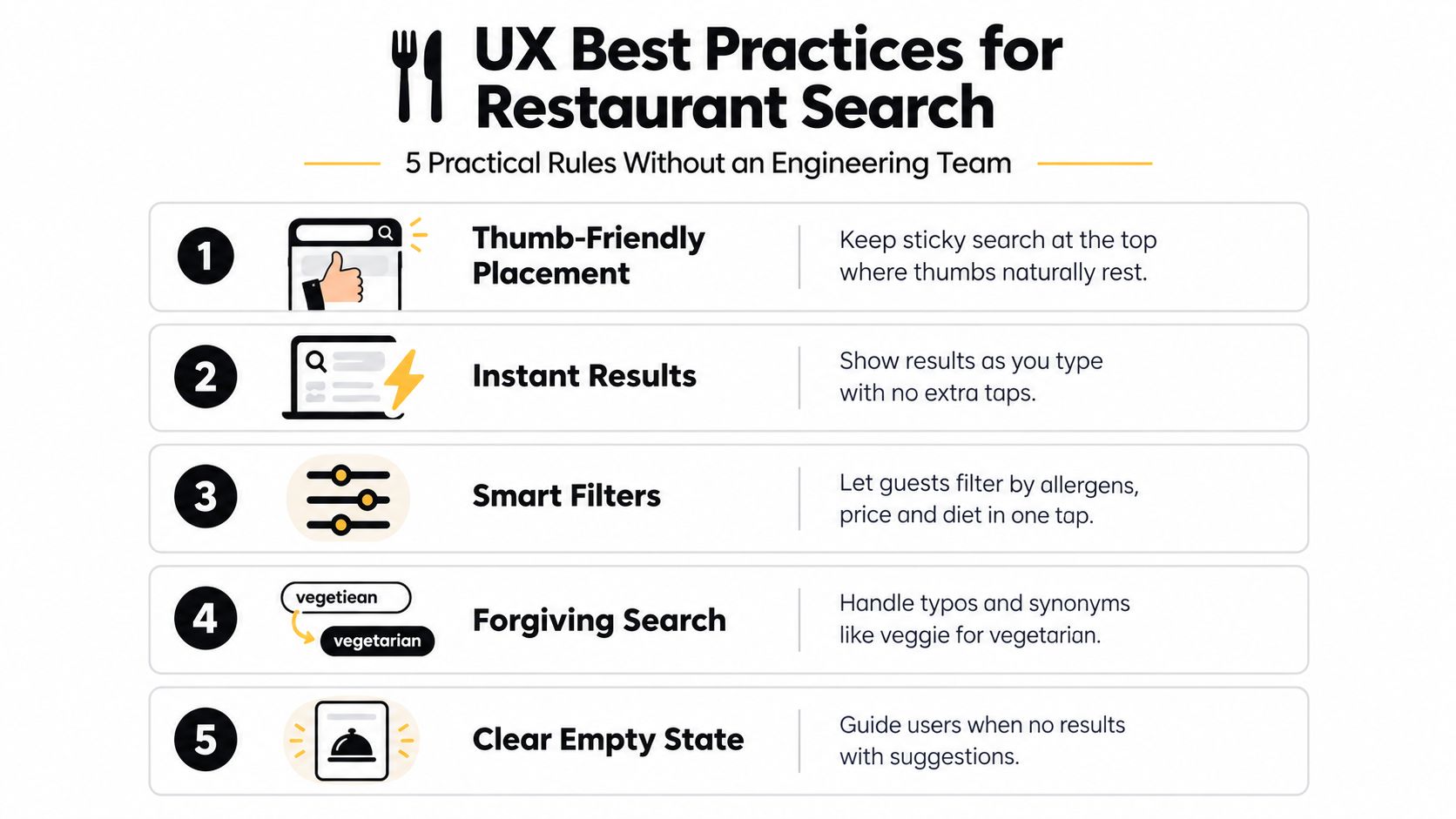
Keep the search field visible near the top of the mobile menu, and consider a sticky treatment while guests browse. Don't bury it behind several category taps. The field should have a clear label, a recognizable search icon, and an obvious cancel or clear action.
Autocomplete should begin helping early. Suggestions can include dishes, categories, ingredients, and dietary tags. Typo tolerance matters because guests type quickly on small keyboards. A query such as “glueten” should still guide the guest toward gluten-related results, while synonyms such as “veggie” should connect to the restaurant's vegetarian terminology.
Make filters visible and understandable
Place allergen and dietary filters above the results as readable chips or buttons. A guest shouldn't have to open a hidden settings panel to exclude an ingredient that affects what they can safely eat.
Use plain labels and preserve active state. If a guest selects a nut exclusion, the interface should show that choice throughout the result view, not hide it and leave the customer guessing.
Design result cards for scanning
Each result should provide enough information to make the next decision. Show the dish name, price, a concise description, category context, and an image when one adds value. Preserve the category label so guests know whether they're looking at a main, side, dessert, or drink.
Keep tap targets generous and avoid shifting the layout as suggestions load. Guests shouldn't lose their place because a result card expands or a filter bar suddenly pushes content downward. For operators working on local visibility as well as on-menu discovery, practical guidance on how restaurants can drive foot traffic with SEO complements the in-menu experience.
A responsive implementation should keep the menu usable across phones and tablets. See how responsive menu design supports that broader foundation, then test the actual guest journey on a real device rather than relying only on a desktop preview.
Measuring Search Performance and Conversion
A search bar opening isn't a business outcome. Neither is a high count of queries by itself. Restaurant operators should measure whether guests find suitable dishes, add them to carts, complete orders, and move through the menu without unnecessary friction.
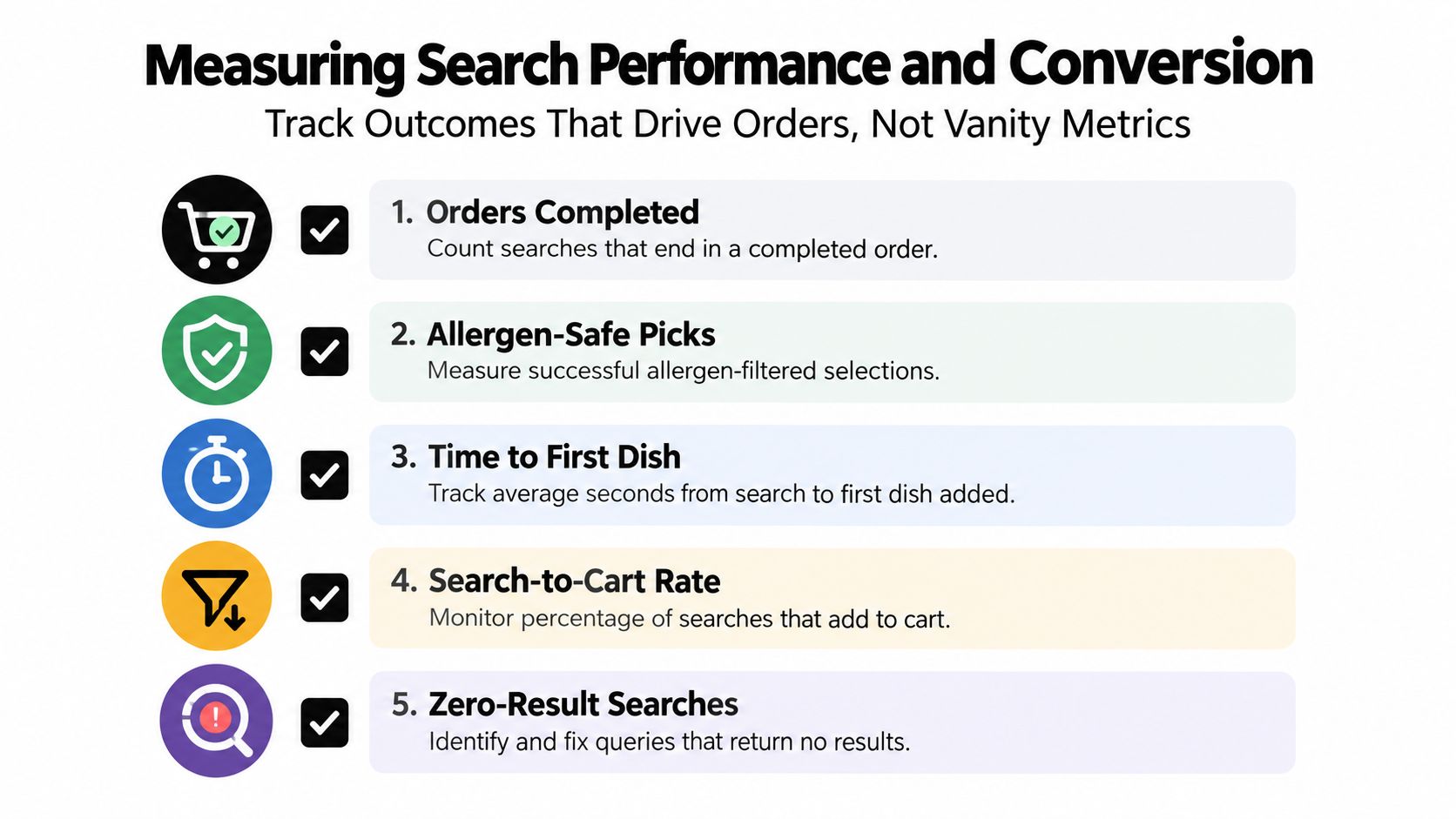
The most useful dashboard connects search behavior to actions. Track the following:
- Zero-result rate: Identify queries that return nothing, then add missing synonyms, improve dish descriptions, or fix stale availability.
- Search-assisted order rate: Compare orders that used search with sessions that relied only on browsing.
- Median time-to-select: Measure the time from a search or filter action to the first meaningful dish selection.
- Search-to-cart rate: Check whether results lead to an item added to the cart, not merely a result view.
- Allergen-filtered selections: Review whether guests using allergen filters reach a suitable dish and continue toward ordering.
Use a weekly operating rhythm
Review search logs weekly, alongside menu changes and order patterns. Start with zero-result queries. They often reveal language gaps, such as customers searching for “fries” when the menu says “chips,” or looking for a dietary term that the restaurant never uses in its descriptions.
Next, inspect filters by category. If guests frequently open allergen filters but rarely select a result, the issue may be incomplete tagging, unclear safety language, weak result presentation, or a menu category that lacks suitable options. Don't assume the filter is working just because it registers taps.
Finally, compare conversion behavior between search-assisted sessions and browsing-only sessions. The comparison won't prove that search caused an order, because guest intent differs, but it can reveal whether search users encounter unusual drop-off. Pair that view with latency monitoring and qualitative feedback from staff and guests.
Avoid vanity metrics
“Searches per session” can mislead on a small menu. A guest may search repeatedly because the first results are poor, because spelling failed, or because filters reset between views. A lower query count can reflect a clear menu, not weak engagement.
Measure task completion instead. The right question is whether the guest found a dish they could confidently choose. That's the feedback loop that improves descriptions, tags, categories, and search rules instead of producing a dashboard full of disconnected activity counts.
Building Fast Search with TopFoodApp
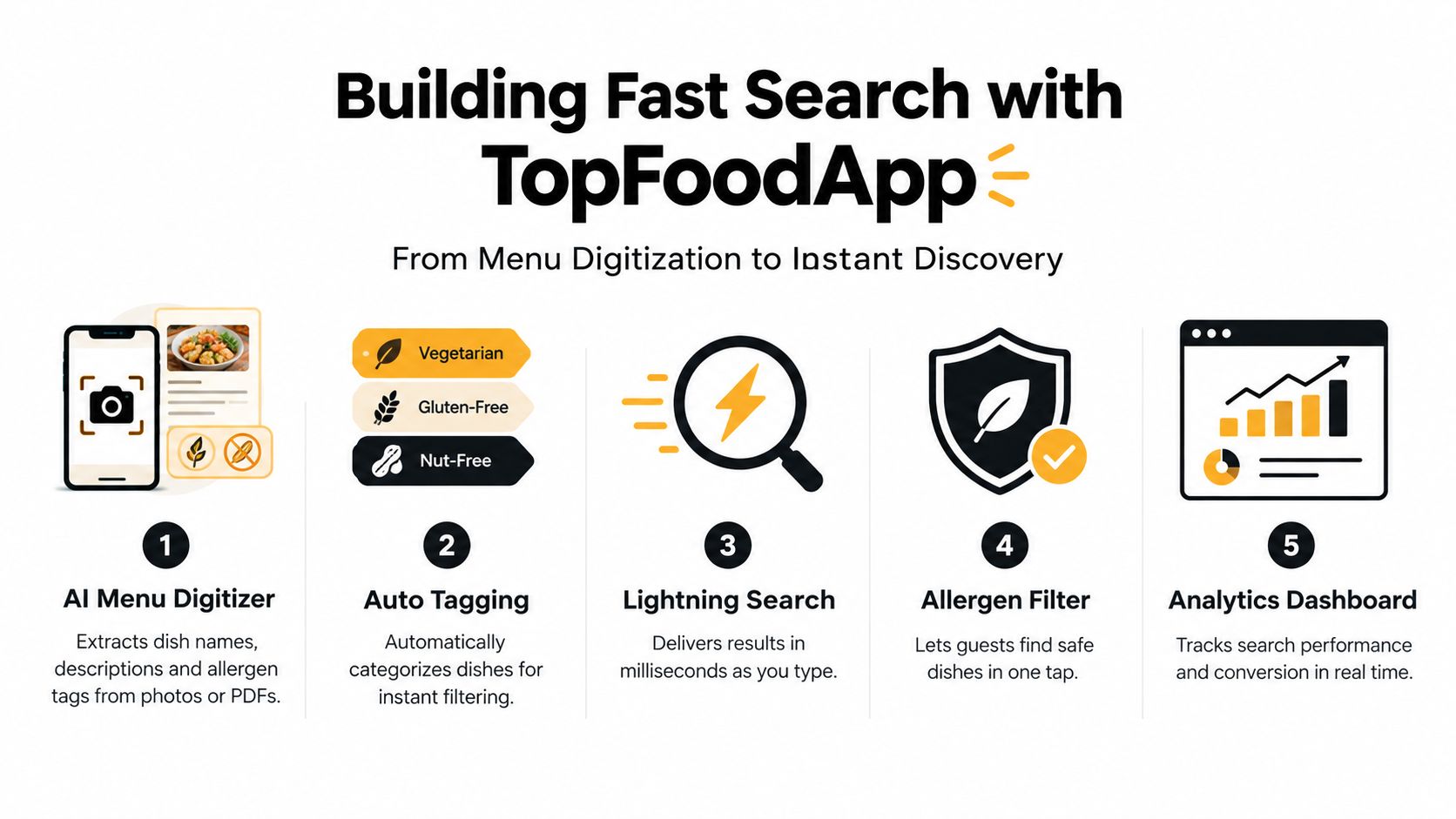
Moving from a static PDF to structured menu data is often the hardest practical step. Search can't rank an allergen or ingredient that the system never captured. TopFoodApp's AI Menu Digitizer converts menu photos or PDFs into structured menu content, including dish names, descriptions, and allergen tags, giving operators a populated starting point rather than requiring every field to be entered manually.
The important distinction is where filtering happens. With a properly structured index, an allergen or dietary condition can narrow the eligible set before results are ranked. That's safer and clearer than displaying broad matches first and asking guests to inspect every item afterward. TopFoodApp supports allergen management for the 13 EU regulated allergens, giving restaurants a defined framework for tagging and filtering, although operators remain responsible for verifying ingredients, preparation practices, and customer-facing safety information.
Configure the guest journey
A useful setup checklist is short:
- Verify allergen tags: Review every extracted tag against the current recipe and kitchen process.
- Test real queries: Search dish names, ingredients, dietary terms, common synonyms, and misspellings.
- Inspect empty states: Make sure no-result searches suggest nearby categories or alternative terms.
- Check mobile behavior: Test thumb reach, filter visibility, result scanning, and layout stability on a real phone.
- Review performance reports: Watch zero-result searches, search-assisted orders, filter use, and time-to-selection weekly.
TopFoodApp's mobile-optimized searchable menus can place the search experience inside the menu rather than sending guests to a disconnected page. Operators can create and manage structured menus through the free digital menu creator, then refine the content as dishes, prices, and seasonal availability change.
Google's removal of FAQ rich results globally as of May 7, 2026, documented in its Search updates, also reinforces a broader product lesson. Restaurants should judge structured content by whether it improves discovery, readability, accessibility, and completed actions, not by chasing a search feature that has been deprecated.
Start with accurate item data, visible filters, clear result cards, and a small set of outcome metrics. That combination usually moves the needle more than adding an elaborate search model to an unstructured menu.
TopFoodApp helps restaurants create searchable QR menus with structured dishes, mobile-friendly browsing, and allergen filtering without requiring an engineering team. Visit TopFoodApp to turn your current menu into a discoverable ordering surface, then test the guest journey with real dishes, dietary queries, and zero-result searches before your next busy service.