AI menu translation
Your menu, in every guest's language
Write your menu once, in your own language. Guests choose theirs on the QR menu and read every dish, description and allergen translated by AI. When you change a dish, the translations follow on their own.
Free with one translation language. With Pro, every guest can pick from 50+ languages.
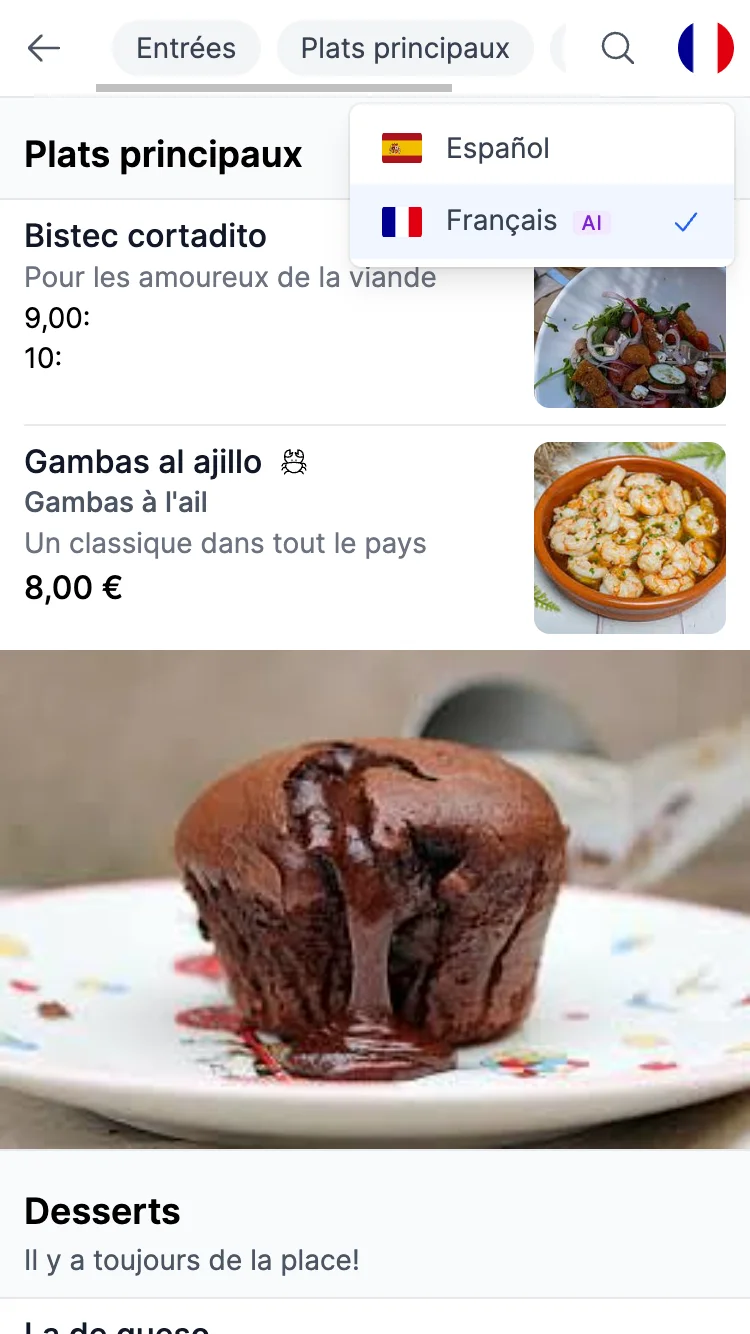
One dish, six languages
Every guest reads the same dish in their own language
This is a dish from a Spanish menu, as guests read it after AI translation. The price stays as you set it, and the allergen is translated too.
-
Español Your original
Gambas al ajillo
8,00 €Gambas salteadas en aceite de oliva con ajo laminado y guindilla.
Crustáceos
-
English Translated by AI
Garlic prawns
8,00 €Prawns sautéed in olive oil with sliced garlic and chilli.
Crustaceans
-
Français Translated by AI
Gambas à l'ail
8,00 €Gambas sautées à l'huile d'olive, avec de l'ail émincé et du piment.
Crustacés
-
Deutsch Translated by AI
Knoblauchgarnelen
8,00 €In Olivenöl gebratene Garnelen mit Knoblauchscheiben und Chili.
Krebstiere
-
日本語 Translated by AI
ガンバス・アル・アヒージョ
8,00 €スライスしたニンニクと唐辛子を加え、オリーブオイルで炒めたエビ。
甲殻類
-
العربية Translated by AI
قريدس بالثوم
8,00 €قريدس مُشوَّح بزيت الزيتون مع شرائح الثوم والفلفل الحار.
القشريات
Your menu can be translated into all of these languages
Albanian · Amharic · Arabic · Basque · Bengali · Bosnian · Bulgarian · Catalan · Chinese · Croatian · Cypriot Greek · Czech · Danish · Dutch · English · Estonian · Faroese · Fijian · Filipino · Finnish · French · German · Greek · Hawaiian · Hebrew · Hindi · Hungarian · Icelandic · Indonesian · Italian · Japanese · Korean · Latvian · Lithuanian · Macedonian · Malay · Maltese · Marathi · Norwegian · Persian · Polish · Portuguese · Romanian · Russian · Samoan · Serbian · Slovak · Slovenian · Spanish · Swahili · Swedish · Tamil · Telugu · Thai · Tongan · Turkish · Ukrainian · Urdu · Vietnamese
How it works
You set it up once. After that there is nothing to keep up to date.
-
1
Write or import your menu
Type it in the editor, or upload the PDF or photos of the menu you already have. In your own language.
-
2
Switch on AI translation
Tell us the language your menu is written in and switch translation on. On the Free plan you choose one language. On Pro every language is available, and you decide which ones guests see first.
-
3
Guests choose their language
Same menu, same QR code. A language selector at the top of the menu changes every dish, description and allergen. Nothing to install.
What AI translation takes care of
- Translations that update themselves
- Change a price, add a dish or rewrite a description, and the translations are refreshed on their own within minutes. There is no button to press.
- One menu and one QR code for every language
- No separate menu for each language and no extra QR codes to print. Guests change the language on the menu itself.
- Allergens in the guest's language
- Allergen names, and the buttons and labels of the menu, change language too, so a guest with an allergy can check every dish.
- Your formatting is kept
- Bold text, lists and line breaks in your dish descriptions come out exactly as you wrote them.
- Dish names guests recognise
- Section names and dish descriptions are always translated. A dish that guests already know by its name, like pizza or ramen, keeps that name.
- Right-to-left languages
- Arabic, Hebrew, Persian and Urdu are laid out from right to left, the way those guests read.
Free with one language, every language with Pro
AI translation is part of the free plan, and the whole menu is translated. Pro adds every other language.
Free
Your menu plus one translation language
- One translation language of your choice
- Every menu, section, dish and description, with no limit
- Updated automatically every time you edit the menu
Guests switch between your original menu and the language you chose.
Pro
Every language, for every guest
- 50+ languages, so every guest reads the menu in their own
- You choose which languages are listed first, and in what order
- Until you choose, the languages most spoken by visitors to your country are listed first
Upgrade from your dashboard whenever you need it. Pro also unlocks custom colours and fonts for your menu.
Frequently asked questions
- Is AI menu translation free?
- Yes, with one language. On the Free plan you choose one language and your whole menu is translated into it, with no limit on dishes or updates. On Pro, each guest can pick any of the 50+ languages.
- How good are the AI translations?
- The translations are written by current large language models, instructed to translate like a professional menu translator. Most restaurants publish them as they are. If a translation ever reads oddly, rewording your original text usually fixes it in every language at once.
- Can I correct a translation by hand?
- Not at the moment. Translations always follow your original text, so to change a translation you edit the original, and every language is updated a few minutes later.
- What happens when I change my menu?
- Nothing, on your side. When you edit a dish, a price or a section, the translations are refreshed in the background within a few minutes. In the meantime the menu stays readable, showing the previous translation, or your original text for a dish you have just added.
- Which languages can my menu be translated into?
- More than 50 languages, including English, Spanish, French, German, Italian, Portuguese, Dutch, Polish, Russian, Ukrainian, Turkish, Arabic, Hebrew, Hindi, Chinese, Japanese, Korean, Thai and Vietnamese. The full list is further up this page.
- Do my guests need an app or a different QR code?
- No. Guests scan the same QR code as always and choose their language from the selector at the top of the menu. Nothing to install.
Welcome every guest in their own language
Create your menu, switch on AI translation and print your QR code. It takes a few minutes and no credit card.